
TL;DR

Get business pricing on tech for your team
- Business-only prices and quantity discounts
- Tax-exempt purchasing
- Multiple users, one account, clear invoices
Buying a prebuilt AI workstation can be faster and less risky, especially with current supply shortages and component price spikes. Building offers more control but often takes longer and can be more expensive if you factor in hidden costs. Your decision depends on your timeline, workload, and customization needs.
Imagine this: you need an AI workstation to run models, fine-tune data, or generate content. Do you build it from scratch, pulling all the levers yourself? Or do you buy a ready-made system that’s been tested, tuned, and ready to go?
This isn’t just about saving money. It’s about speed, risk, control, and long-term strategy in a market where component shortages and prices have skyrocketed. For more insights, see Build vs Buy a Prebuilt AI Workstation. In 2026, the old rule — build cheaper, buy faster — no longer always applies. Let’s break down the real tradeoffs, so you can make a smart choice.
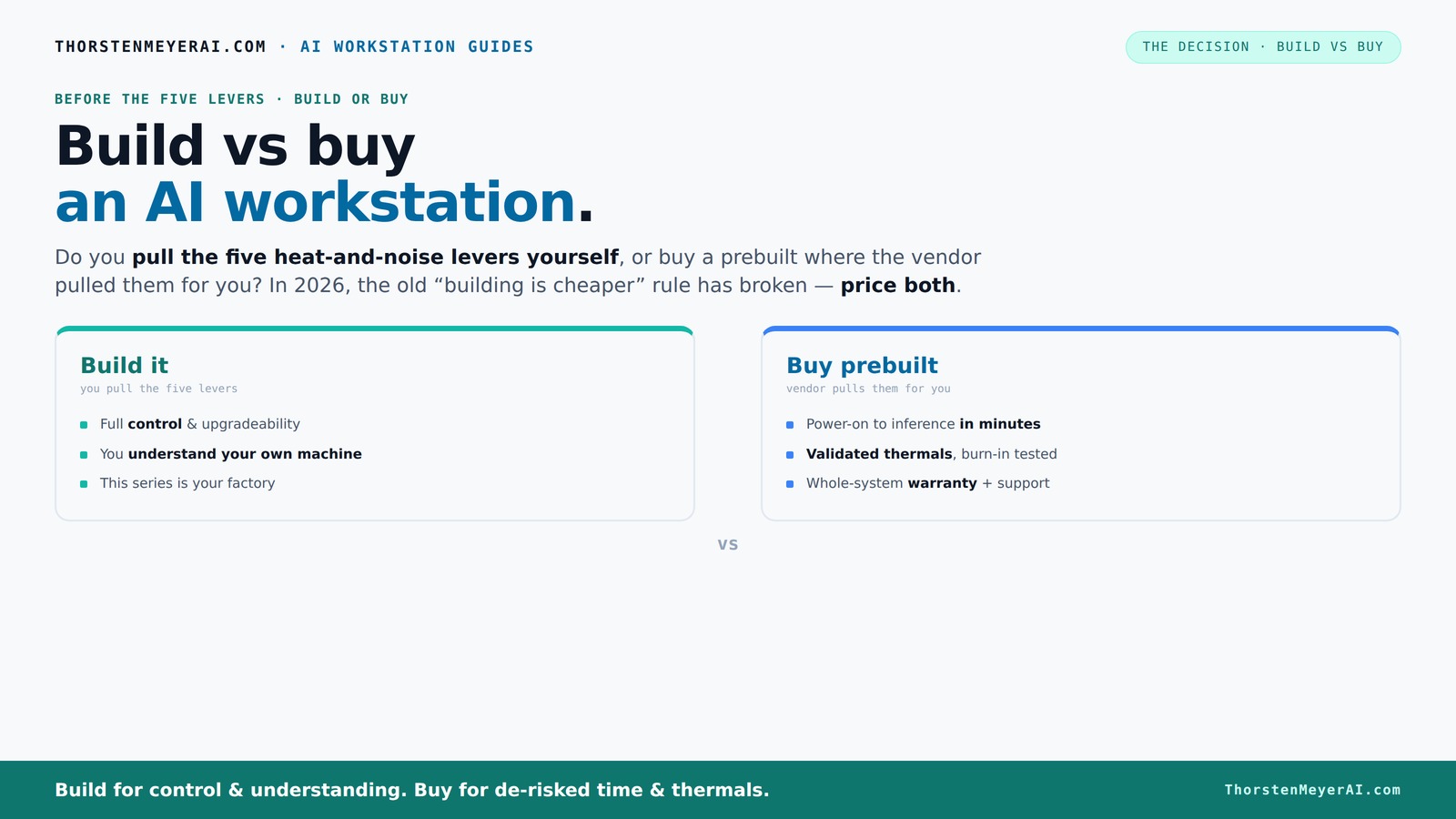
Build vs buy
an AI workstation.
The real question behind this whole series: do you pull the five heat-and-noise levers yourself, or buy a prebuilt where the vendor pulled them for you? And in 2026, the old “building is cheaper” rule has broken. Match your situation in Part 3.
Key Takeaways
- Supply chain chaos in 2026 makes prebuilt systems often as affordable as DIY builds, especially for high-end AI workstations.
- Prebuilts offer validated thermals, warranty, and quick deployment, ideal for time-sensitive AI projects.
- Building your own system grants maximum control, upgradeability, and personal satisfaction, but demands time and expertise.
- Hybrid setups can balance speed and customization — buy the core, upgrade the parts that matter most.
- Consider security, compliance, and total cost of ownership rather than just upfront price when choosing.
As an affiliate, we earn on qualifying purchases.
Why the old rule 'build cheaper' no longer holds in 2026
Building your own AI workstation used to be a straightforward way to save money. You sourced parts, assembled it, and kept costs below prebuilt options. But recent supply chain chaos changed that. For guidance, see Build vs Buy a Prebuilt AI Workstation.
Component shortages for GPUs, DDR5 RAM, and SSDs have pushed prices up by 20-50%. A DIY rig that once cost $1,000 now easily hits $1,250 or more before you add an OS license. If you’re considering your options, check out Build vs Buy a Prebuilt AI Workstation. This escalation means that the cost savings of building your own system are diminishing, often disappearing altogether. Meanwhile, prebuilt vendors bought in bulk early, allowing them to negotiate better prices, secure scarce components, and pass those savings onto consumers. This shift means that the traditional advantage of DIY — lower cost — is no longer a given. Instead, builders face longer wait times and higher prices, while prebuilt systems offer immediate, reliable performance at comparable or even lower prices. The implication? Cost considerations alone are no longer sufficient; speed, reliability, and component availability are now critical factors. If you’re trying to maximize value, you need to understand that the market dynamics have fundamentally changed, making prebuilt systems a more attractive option for many.
As an affiliate, we earn on qualifying purchases.
The heat-and-noise battle: who pulls the five levers?
Cooling and noise control are critical for high-power AI rigs. The five levers — undervolting the GPU, matching coolers, optimizing airflow, tuning fans, and strategic placement — make or break thermal performance. For more on thermal management, see Build vs Buy a Prebuilt AI Workstation.
Buy a prebuilt? The vendor pulls these levers, validating the system under load, running burn-in tests, and sometimes even water-cooling for quiet operation. This means a preconfigured system is not just plug-and-play; it's optimized for sustained high performance with minimal noise and thermal throttling. The implications are significant: you benefit from engineering expertise, which translates into a system that maintains performance without overheating or excessive noise, especially important in shared or quiet environments. For users who need heavy workloads, this thermal management ensures consistent performance and longevity of components. Conversely, building it yourself requires you to understand the thermal characteristics of each component, select compatible cooling solutions, and fine-tune airflow. While this offers the reward of a highly tailored system, it also introduces risks: improper cooling can lead to thermal throttling, reduced lifespan, or noisy operation. The tradeoff is clear: prebuilt systems reduce guesswork and ensure thermal stability, while custom builds offer the potential for quieter, more efficient cooling if done correctly — but demand expertise and time.
As an affiliate, we earn on qualifying purchases.
Speed and simplicity: why prebuilt wins for most users
If you need an AI workstation fast, buying usually beats building. A prebuilt arrives with everything installed — OS, drivers, AI frameworks like CUDA, PyTorch, TensorFlow — ready to run. Learn more about quick deployment options at Build vs Buy a Prebuilt AI Workstation.
Imagine a startup needing a machine today for model inference. Waiting two weeks for parts, assembly, and testing can cost you clients or delay projects. Prebuilts from trusted vendors can have you operational in days, not weeks. This rapid deployment isn’t just about convenience; it can be the difference between meeting a project deadline or missing it entirely. The convenience of immediate readiness reduces downtime, accelerates experimentation, and allows teams to focus on development rather than troubleshooting hardware. Furthermore, prebuilt systems come with support and warranties, which means that if something goes wrong — thermal issues, hardware failures, or software conflicts — the vendor handles the problem. This support infrastructure can save hours or days that would otherwise be spent troubleshooting, especially under pressure. For most users, especially those with tight schedules or limited technical expertise, prebuilt systems offer a practical, reliable, and time-efficient solution that minimizes risk and maximizes productivity.
As an affiliate, we earn on qualifying purchases.
Cost comparison: build vs buy — what’s the real picture?
| Factor | Build |
|---|---|
| Upfront hardware cost | Often cheaper on paper, but recent shortages push prices up. DIY parts can hit $1,200+. |
| Labor & expertise | Requires time, skill, and patience. Mistakes lead to hidden costs. |
| Warranties & support | Limited unless you buy extended support or assemble from pre-certified parts. |
| Time to ready | weeks to months, depending on your experience and component availability. |
| Long-term maintenance | Higher if you handle troubleshooting, upgrades, and thermal tuning. |
Buying? You might pay a premium upfront, but vendors leverage bulk buying and validation, often matching or beating DIY costs. Additionally, the total cost of ownership includes support, warranty coverage, and the potential costs associated with troubleshooting hardware issues or delays caused by component shortages. These factors can significantly offset the initial price difference, especially when factoring in the value of time saved and reduced risk of hardware failure. Consequently, although prebuilt systems may seem more expensive initially, their reliability, support, and faster deployment often make them more cost-effective in the long run, particularly in a supply-constrained market where delays and hidden costs are common.
Upgradeability and future-proofing: which approach wins?
Building gives you full control over hardware choices, making upgrades easier. Swap out GPUs, add RAM, or replace cooling components as needed. For more on future-proofing, visit Build vs Buy a Prebuilt AI Workstation.
Prebuilts? They often use proprietary cases or power supplies, limiting upgrade options. Some vendors allow certain upgrades, but you’re generally more locked in. The key consideration is how the initial design accommodates future hardware. A custom build can be tailored to include standard, modular components that are easy to swap or upgrade, extending the lifespan of the system and adapting to evolving workload requirements. However, this requires planning and technical skill. Prebuilt systems, on the other hand, may restrict upgrades due to proprietary parts or design limitations. While some high-end prebuilts offer upgrade paths, they tend to be more limited and less flexible. The tradeoff is that building your own system allows you to plan for future expansion, but it demands ongoing maintenance and technical knowledge. For those committed to long-term growth and frequent upgrades, building provides maximal flexibility. Yet, if you prefer a system that remains stable and reliable over several years without frequent tinkering, a well-chosen prebuilt can be sufficient, especially if it’s designed with upgradeability in mind.
Security, compliance, and control: why it matters
For sensitive workloads, data sovereignty and control are key. Building your own system means you own every piece — hardware, software, network setup.
Prebuilt systems? They often come with vendor access, remote management, and potentially more exposure to third-party risks. That’s fine for many, but less so for highly regulated environments. The implications are significant: owning your hardware and software stack allows you to implement custom security measures, enforce strict access controls, and ensure data residency compliance. Conversely, prebuilt systems may include remote management tools or pre-installed software that could introduce vulnerabilities or compliance challenges if not properly managed. For organizations handling sensitive data or operating under strict regulatory frameworks, this difference can be critical. Building your own system provides maximum control over security protocols, encryption, and audit trails, reducing the risk of data breaches or non-compliance. The tradeoff is that maintaining this level of security requires ongoing effort and expertise, whereas prebuilt systems often rely on vendor-provided security features that may not align perfectly with specific compliance needs. Ultimately, the decision hinges on your security priorities and regulatory obligations, with building offering a higher degree of customization and control.
When to consider a hybrid approach
The smartest move isn’t strictly build or buy. Instead, consider a hybrid: buy a base system, then customize key components like GPUs or storage.
This way, you save time on core setup while tailoring performance for your workload. For example, buy a prebuilt with a solid CPU and chassis, then swap in a quieter GPU or higher VRAM module. Hybrid solutions allow you to leverage the reliability and speed of prebuilt systems while adding your own customizations to optimize performance or noise levels. This approach is especially useful if your workload evolves over time or if you want to experiment with different configurations without starting from scratch. It also offers a balanced compromise: you get the assurance of a tested base system combined with the flexibility of targeted upgrades. The implication is that hybrid strategies can reduce overall project timelines, lower initial costs, and provide a pathway to incremental improvements. For users who value both quick deployment and future customization, this approach offers a pragmatic middle ground that maximizes the strengths of both build and buy strategies.
Frequently Asked Questions
Should I build or buy an AI workstation if I need results fast?
Buy a prebuilt. It arrives ready-to-run with supported software, validated thermals, and support — perfect for quick deployment and minimizing downtime.Is a prebuilt workstation good enough for local LLM inference or fine-tuning?
Absolutely. Modern prebuilt systems from reputable vendors are designed for these workloads, often including multi-GPU setups, ample VRAM, and cooling for sustained high load.How do I compare the total cost of ownership between build and buy?
Factor in hardware costs, assembly time, troubleshooting, support, upgrades, and downtime. Recent prices and support options often tilt the balance toward buying, especially with component shortages.Can I upgrade a prebuilt AI workstation later?
It depends. Some vendors use proprietary parts, limiting upgrades. But many high-end prebuilts allow GPU or RAM upgrades; check the vendor’s upgrade policies first.What specs matter most for AI workloads: GPU, VRAM, RAM, or CPU?
GPU and VRAM are king for training and inference. But don’t overlook high-quality CPUs, fast storage, and enough RAM — they all contribute to smooth, efficient operation.Conclusion
Choosing between build and buy isn’t just about dollars. It’s about your timeline, your confidence in hardware tweaks, and how much control you want over every detail.
In 2026, the smart move for most is to buy a validated, support-backed system if speed and reliability matter. But if you thrive on tinkering or need tailored hardware for long-term innovation, building still has its place.
Ask yourself: is your goal quick results or long-term control? The answer shapes your best move.
Halloween Picks
halloween
As an affiliate, we earn on qualifying purchases.