
TL;DR
AI-powered note-taking apps automate transcription, summarization, and organization, saving time and reducing effort. They leverage natural language processing and speech recognition to make notes smarter and more accessible.
Imagine sitting through a long meeting or lecture, and instead of frantically jotting down notes, your app captures every word accurately, summarizes key points instantly, and even suggests follow-up tasks. That’s the promise of AI-powered note-taking apps. They’re not just digital notebooks; they’re smart assistants that turn raw information into actionable insights.
If you’re tired of scrolling through endless notes or missing crucial details, understanding what these tools can do — and where they’re headed — could change your entire approach to note-taking. Let’s explore how AI is transforming a simple task into a powerful productivity booster.
AI automates transcription, summarization, and tagging, drastically reducing manual effort.
Recent apps incorporate multimodal inputs and real-time transcription, making notes more versatile.
Advanced search and smart suggestions turn notes into living, interconnected knowledge hubs.
Market growth and innovation continue, but privacy and security remain vital considerations.
AI tools are best seen as powerful assistants that complement your traditional note-taking, not replacements.
How AI Supercharges Your Note-Taking Power
AI makes note-taking more than just typing or scribbling. It automates the boring parts — transcribing speech, sorting notes, and highlighting what matters. For example, apps like Otter.ai can turn a speech into text with over 95% accuracy, even in noisy environments. That means your meeting notes are ready in seconds, not minutes.
Beyond transcription, AI helps distill lengthy recordings or texts into concise summaries. Imagine ending a two-hour webinar with a one-paragraph recap. Natural language processing (NLP) is the secret sauce, enabling apps to understand context, extract key points, and generate actionable items.
This automation frees you from manual organization, letting you focus on the ideas and decisions that matter most.
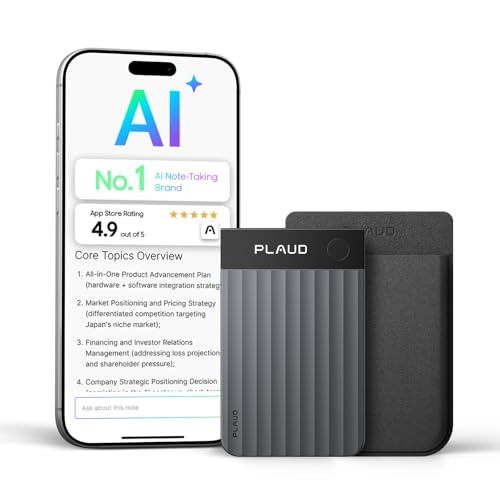
Plaud Note Pro AI Voice Recorder Transcribe & Summarize for Meetings Calls
- High-Accuracy Transcription: Supports 112 languages with speaker labels
- Instant Summaries & Templates: Creates structured summaries, mind maps, and lists
- Multimodal Input Support: Capture audio, images, and typed notes
As an affiliate, we earn on qualifying purchases.
As an affiliate, we earn on qualifying purchases.
5 Ways AI Makes Your Notes Smarter and Easier to Find
| Feature | What It Does |
|---|---|
| Voice Recognition | Dictate notes hands-free with high accuracy, even in noisy settings. This reduces the cognitive load, allowing you to focus on content rather than manual entry, which is especially valuable during fast-paced meetings or when multitasking. However, reliance on voice recognition may introduce errors in complex or technical language, so understanding its limitations helps manage expectations. |
| Smart Tagging | AI automatically tags notes based on content, making retrieval simple. This feature enables a more intuitive organization system, but it also introduces tradeoffs: incorrect tags can lead to confusion or missed information if not reviewed regularly. The ability to customize tags and review suggestions ensures better accuracy and relevance over time. |
| Advanced Search | Find specific info instantly using natural language queries. This capability transforms static notes into dynamic knowledge bases, reducing time spent searching through archives. Yet, the effectiveness depends on how well the AI understands context and semantics, which varies across platforms. Improving search accuracy means investing in smarter algorithms and user feedback loops. |
| Contextual Suggestions | Apps recommend related notes or resources based on what you’re working on. This feature encourages a more interconnected workspace, fostering insight discovery and reducing redundant effort. The tradeoff is potential information overload or irrelevant suggestions if the AI’s understanding of context isn’t precise enough, highlighting the importance of adjustable settings and user control. |
| Summarization | Get quick overviews of long recordings or texts, saving time and mental energy. Summaries can help prioritize what to review, but they may omit nuanced details or context, leading to incomplete understanding. Striking a balance between brevity and completeness is crucial, and users should verify summaries for accuracy before acting on them. |
voice recognition transcription device
As an affiliate, we earn on qualifying purchases.
As an affiliate, we earn on qualifying purchases.
What’s New? The Latest in AI Note Apps
Recent updates have pushed AI note apps into new territory. Now, apps like Notion and Evernote use AI to generate summaries, extract action items, and suggest related notes. For example, during a project kickoff, an AI can highlight deadlines and responsibilities automatically — no manual tagging needed.
Multimodal inputs are also gaining traction. You can upload a photo of handwritten notes, record a quick audio memo, or insert images — and AI stitches everything into a coherent note. Real-time transcription has improved too, with models like OpenAI’s Whisper delivering near-perfect accuracy.
These advancements mean your notes aren’t static. They evolve into dynamic, interconnected hubs of information tailored to your workflow. However, integrating multiple input methods requires careful design to ensure consistency and prevent information overload. Balancing automation with user control remains a key challenge for developers.
As an affiliate, we earn on qualifying purchases.
Key Trends Shaping the Future of AI Note Apps
The market for AI-powered note apps is exploding. With remote work and digital collaboration booming, these tools are becoming essential. According to industry reports, the global market is expected to grow by over 20% annually through 2025.
Major players like Microsoft, Google, and startups are racing to integrate AI features that learn from user habits. Personalization is key — your app adapts to your style, suggesting shortcuts or automating routine tasks. This customization can significantly boost productivity, but it also raises concerns about data privacy, as more personal data is collected to refine these features.
But challenges remain. Data privacy and security are critical, especially when sensitive information is processed. Stricter regulations and user controls are emerging to address these concerns, balancing convenience with trust. The future of AI note apps hinges on finding the right balance between innovation, user trust, and ethical data use.
As an affiliate, we earn on qualifying purchases.
Your Top Questions About AI-Powered Note Apps — Answered
- How accurate are transcription and summaries? In ideal conditions, accuracy exceeds 95%. Background noise, accents, or complex language can lower precision, but ongoing improvements are closing the gap. This accuracy level matters because it determines how much you can rely on automated notes without manual correction, impacting overall efficiency and trust in the tool.
- Are my notes safe? Most apps use encryption and privacy policies. Still, it’s wise to review each app’s security features before trusting them with sensitive data. The implication is that choosing a secure platform is critical, especially for confidential or proprietary information, and understanding the tradeoffs between convenience and security helps in making informed decisions.
- Can AI replace manual notes? They complement your efforts, automating routine parts. In some scenarios, manual notes still capture nuances AI can’t understand. This highlights that AI is best used as an assistant, not a complete replacement, preserving the human element in critical thinking and contextual understanding.
- What’s the cost? Many apps offer free tiers with limited features. Premium plans, ranging from $5–$20/month, unlock advanced tools like deeper summaries or integrations. The tradeoff involves balancing budget constraints with the need for comprehensive features, prompting users to evaluate what level of automation and customization they require.
- Do they support multiple languages? Leading apps support dozens of languages, with accuracy improving for dialects and accents over time. This multilingual support broadens accessibility but also presents challenges in maintaining high accuracy across diverse linguistic nuances, emphasizing the importance of continuous AI training and user feedback.
Conclusion
AI-powered note-taking apps are no longer just a tech novelty; they’re a game-changer for anyone drowning in information. The smarter your notes become, the faster you can access, review, and act on what matters.
Embrace these tools thoughtfully. They’ll free your mind from clutter and help you focus on the ideas that truly count. After all, the future of note-taking isn’t just digital — it’s intelligent.