This checklist is for people putting together an AI automation lab who need to think through development hardware, storage, networking, and device control. It can help you identify which parts have a named pick and which still call for research based on your setup.

Get business pricing on tech for your team
- Business-only prices and quantity discounts
- Tax-exempt purchasing
- Multiple users, one account, clear invoices
The sections follow the hardware categories in the checklist: edge AI development boards, USB devices, NVMe storage, PoE networking, relay modules, and power meters. The named picks are listed under the closest matching slots, but their names alone do not establish that they are suitable for those roles.
Use each section to define your requirements before choosing hardware. Check interfaces and compatibility against your existing equipment, and treat advice-only slots as decisions to make from your project needs rather than as product recommendations.
Edge AI development board
This slot matters because an edge AI development board is the part you would evaluate for running or prototyping workloads near your devices. The checklist provides no product pick here, so start by writing down what the board needs to connect to and what role it will play in your lab.
A common mistake is to choose a board before checking the software and hardware around it. List required ports, supported peripherals, operating environment, and the physical space available. Confirm compatibility with the cameras, sensors, storage, and network connections you plan to use. If your project depends on a particular accelerator or interface, verify that support from the board’s documentation before buying.
Fit is about your complete setup: how the board will be mounted, powered, cooled, and reached for maintenance. Compare those needs with your enclosure and cabling plan. The right choice depends on your intended workload and connected equipment, so keep this slot open until those requirements are clear.
What to look for:
- Required ports and peripheral interfaces
- Compatibility with your intended software and devices
- Mounting space and enclosure fit
- Power and cooling requirements for your setup
USB accelerator
The listed pick is an 8GB Bulk USB Flash Drive 50 Pack described as colorful USB 2.0 thumb drives. Its name identifies it as flash storage, not an accelerator, so do not assume it can perform USB acceleration tasks. This mismatch makes it important to verify the intended role before treating it as the slot’s pick.
A common buying mistake is to rely on a category label while overlooking the product description. Check whether your project needs a compute accelerator or removable storage, then compare the product’s documented function with that requirement. If you need an accelerator, verify its supported interfaces, software, and compatibility with the host system. If you need flash drives, check connector fit, capacity, and whether USB 2.0 meets your data-transfer needs.
Also consider how the device fits the lab physically: nearby ports, clearance from adjacent connectors, and access for insertion or removal. Confirm compatibility with your machines rather than assuming a USB connector guarantees the required function. The provided name alone cannot establish accelerator support.
What to look for:
- Documented function: accelerator or flash storage
- Host system and software compatibility
- Connector clearance on adjacent USB ports
- Whether USB 2.0 meets your transfer needs
- Capacity requirements if using it for storage
8GB Bulk USB Flash Drive 50 Pack – Colorful USB 2.0 Thumb Drives with Swivel Loo

This pack includes 50 colorful 8GB USB 2.0 flash drives, featuring a no-cap swivel design for easy attachment to keychains or backpacks. They are plug-and-play, compatible with various devices and operating systems, ideal for promotional giveaways, gifts, and data transfer needs.
Pros:
- Bulk pack offers great value for multiple users or events
- No-cap design reduces risk of losing parts
- Plug-and-play compatibility with many devices
Cons:
- Limited to USB 2.0 speed, not USB 3.0
- Small capacity for large files
- Colorful design may not suit formal settings
Best for: Setups that need USB flash storage after compatibility checks
Not ideal for: Projects requiring a confirmed USB compute accelerator
Bottom line: The product name describes flash drives, so verify its function before assigning it to this slot.
NVMe solid-state drive
The listed pick is an NVMe M.2 SSD Heatsink with an aluminum heat sink and thermal pad, described for PS5 use. Its name identifies a heatsink accessory, not an NVMe solid-state drive. Confirm that you need a cooling accessory before treating it as the storage device for this slot.
A common buying mistake is to confuse an accessory for the component it supports. If you need an SSD, check the drive itself for its interface, form factor, and capacity, and confirm those details work with your system. If you already have a compatible drive and need a heatsink, verify the heatsink’s dimensions and mounting arrangement against the drive and enclosure. A product name mentioning PS5 does not by itself establish fit with other devices.
Plan for physical clearance as well as interface compatibility. Consider the available space, nearby components, and whether the thermal pad and mounting method suit your hardware. The listed name does not provide enough information to verify those details, so consult the product documentation and your device requirements before choosing.
What to look for:
- Whether you need an SSD or a heatsink accessory
- SSD interface, form factor, and capacity if buying a drive
- Heatsink dimensions and mounting arrangement
- Clearance inside the intended device or enclosure
- Compatibility details in product and device documentation
NVMe M.2 SSD Heatsink, Aluminum Heat Sink with Thermal Pad for PS5 & PC NVMe M.2

This aluminum heatsink is designed for M.2 2280 NVMe SSDs, providing efficient cooling with a double-sided design that reduces temperatures by up to 30°C. Made from durable materials with thermal pads for optimal heat transfer, it ensures stable performance and easy installation.
Pros:
- Effective double-sided cooling reduces SSD temperatures significantly
- Durable aluminum construction with corrosion resistance
- Easy to install with simple screw mechanism
Cons:
- Not compatible with dual-layer hard drives
- Requires screw installation, may be challenging for some users
Best for: Owners checking a heatsink accessory for a compatible M.2 drive
Not ideal for: Buyers who need an NVMe SSD itself
Bottom line: This pick is described as a heatsink, so verify your storage and cooling needs separately.
PoE network switch
The listed pick is a Linksys LGS352MPC, described as a 48-port Gigabit PoE+ switch with 740W power. The product name offers specific port and power details, but those details alone do not confirm that the switch fits your network plan or connected devices.
A common mistake is to select a switch based only on port count. Count the devices that need wired network connections and PoE, then check the requirements of each powered device against the switch documentation. Verify that the stated PoE+ support and power budget match the devices you intend to connect. Also consider how the switch will connect to the rest of your network and whether its physical installation works in your space.
Check cable routes, rack or shelf fit, and access for maintenance before buying. Confirm network compatibility with your existing equipment and review the product documentation for details not included in the name. For a lab with changing devices, leave room in your port plan for the connections you expect to add. Make the final choice against a device-by-device list rather than assuming every PoE device has the same requirements.
What to look for:
- Number of wired and PoE connections required
- Each powered device’s documented PoE requirements
- Whether the stated 740W power budget fits your devices
- Compatibility with existing network equipment
- Physical placement, cable routing, and maintenance access
Linksys LGS352MPC 48 Port Gigabit Network PoE+ Switch with 740W Power and 4x 10G
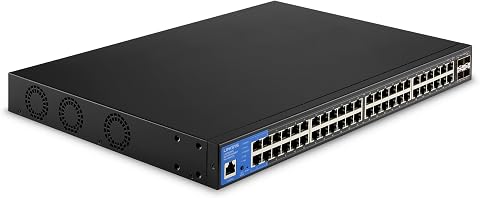
The Linksys LGS352MPC is a 48-port gigabit switch designed for expanded networks, supporting PoE+ for powering devices and featuring 4x 10G SFP+ uplink ports for high-speed connections. It offers advanced security, QoS, VLAN, and static routing features to optimize network performance and security, suitable for surveillance, access points, and other network devices.
Pros:
- High port density suitable for large networks
- Supports PoE+ for powering connected devices
- High-speed 10G uplink ports for fast data transfer
- Enhanced security with MAC-based port security
Cons:
- No mention of fanless or silent operation
- Potentially complex setup for beginners
- Limited details on management interface
Best for: Labs that need many wired connections and compatible PoE+ devices
Not ideal for: Setups without a confirmed need for this port count or power budget
Bottom line: Match every powered device and network connection to the switch documentation before choosing.
USB relay module
A USB relay module can be relevant when a lab needs a computer-controlled connection to external equipment. This checklist gives no product pick, so define the devices and control behavior you need before comparing modules.
A common mistake is to choose by connector alone. Check the module’s documented control interface, supported software, relay count, and electrical ratings against the equipment you plan to control. Confirm the host system can communicate with it, and verify that its switching limits suit the connected load. Do not infer those details from a generic USB description.
Consider the module’s physical fit, enclosure, wiring access, and placement relative to the controlled equipment. Review the manufacturer’s documentation for connection and operating requirements, and confirm your planned wiring is compatible. Keep this slot open until you have a clear list of controlled devices and their requirements.
What to look for:
- Control interface and supported host software
- Number of relay outputs required
- Documented electrical ratings for connected equipment
- Wiring access and enclosure fit
- Compatibility with the intended devices and control workflow
Smart power meter
A smart power meter can help make power monitoring part of a lab plan, but this checklist names no product pick. Start by deciding what you want to measure and where the meter needs to sit in relation to your equipment.
A common buying mistake is to assume meters are interchangeable. Check the documented measurement scope, connection method, supported software or monitoring setup, and electrical requirements. Confirm the meter is intended for the kind of circuit and installation you have. The product documentation should answer how readings are accessed and whether the meter works with your chosen monitoring tools.
Think through physical installation and access: available space, connection points, and whether the meter can be read or serviced in its planned location. Make a list of the equipment or circuit you want to monitor, then compare it with the meter’s stated capabilities. Because no specific model is supplied, compatibility and suitability must be verified against your setup before purchase.
What to look for:
- What equipment or circuit you intend to monitor
- Documented measurement scope and electrical requirements
- How readings are accessed
- Compatibility with your monitoring tools
- Installation space and service access
Use a requirements-first buying order: clarify the edge board and accelerator roles, identify whether storage means an SSD or a heatsink, then map network and PoE needs. Leave relay and power-meter selections until you know which devices you will control or monitor. This order helps expose compatibility questions before you commit to individual components.
You do not need to settle every slot at once. Build a short list of interfaces, physical constraints, and device requirements, then check each candidate against its documentation. With those details in hand, you can fill the advice-only slots thoughtfully and decide whether the named products match the roles your lab actually needs.
Black Friday Picks

Sony WH-1000XM6 Wireless Noise-Canceling Headphones, Black
As an affiliate, we earn on qualifying purchases.